
Tech
Negative Air Pressure Machine: Your Ultimate Guide to Air Filtration and Containment


What is a Negative Air Pressure Machine?
A negative air pressure machine, often referred to simply as a negative air machine, is a specialized air filtration system designed to create and maintain negative pressure in a contained space. This means the air pressure inside the area is lower than outside, causing air to flow inward rather than escaping outward. By doing so, it effectively traps dust, mold spores, allergens, and other airborne particles, preventing them from contaminating adjacent areas.
These machines are commonly used in scenarios where airborne contaminants pose health risks. For instance, during renovation projects or in medical facilities, a negative air pressure machine ensures that hazardous materials like asbestos or infectious particles don’t spread. According to industry experts, these devices can filter particles as small as 0.3 microns with high efficiency, making them indispensable for compliance with safety regulations.
The concept of negative pressure isn’t new; it originated from technologies developed for handling radioactive materials in the mid-20th century. Today, modern negative air pressure machines incorporate advanced HEPA (High-Efficiency Particulate Air) filters, which capture 99.97% of particles at that microscopic level. This makes them far superior to standard air purifiers for heavy-duty applications.
How Does a Negative Air Pressure Machine Work?
At its core, a negative air pressure machine operates by drawing air from the surrounding environment through a series of filters using a powerful fan. The process begins with the machine being placed in or near a sealed containment area. As the fan activates, it pulls contaminated air inward, creating the negative pressure effect. This vacuum-like action ensures that any leaks in the containment draw clean air in, rather than letting dirty air out.
The air then passes through multiple filtration stages. Typically, a pre-filter catches larger debris, followed by a HEPA filter that traps finer particles. Some models include activated carbon filters to neutralize odors and volatile organic compounds (VOCs). Once filtered, the clean air can either be recirculated back into the space or exhausted outside via ducting.
To visualize this, consider a diagram of a typical setup: the machine is positioned inside a contaminated room, with ducting leading to a window for exhaust. Contaminated air enters the machine, gets filtered, and exits as clean air.
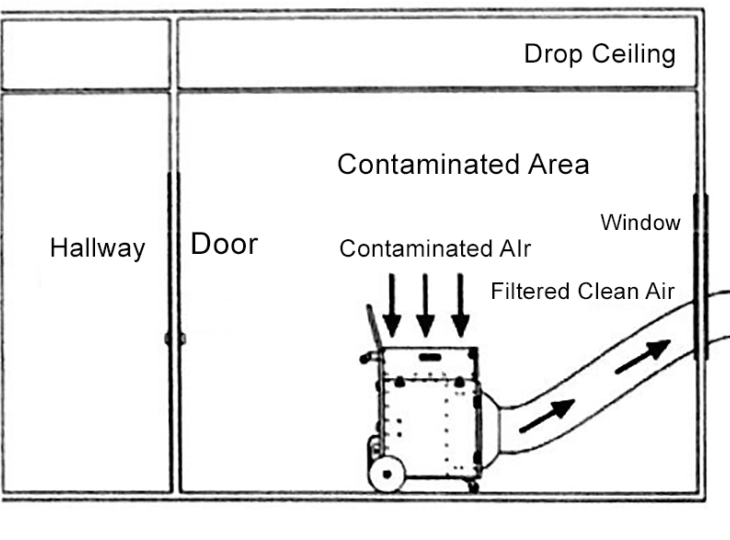
This setup is crucial in preventing cross-contamination, especially in sensitive environments.
The airflow rate, measured in cubic feet per minute (CFM), determines the machine’s effectiveness. For example, a 2000 CFM unit can handle larger spaces, achieving multiple air changes per hour to keep the area safe.
Key Components of a Negative Air Pressure Machine
Understanding the parts of a negative air pressure machine can help in selecting and maintaining one. The primary components include:
- Fan or Blower: This is the heart of the machine, providing the suction needed for negative pressure. High-efficiency blowers, like backward-inclined wheels, offer both high static pressure and airflow.
- Filters: Pre-filters, HEPA filters, and optional carbon filters work in tandem. HEPA filters are the star, meeting standards set by organizations like the CDC for capturing airborne pathogens.
- Housing and Controls: Durable, often portable casings with wheels for mobility. Controls may include speed settings, pressure gauges, and alarms for filter changes.
- Ducting Ports: Allow for attachment of flexible ducts to exhaust air outside, essential for true negative pressure applications.
Additional features like variable speed motors and digital monitors enhance usability, ensuring the machine adapts to different job sizes.
Differences Between Negative Air Machines and Air Scrubbers
While the terms are sometimes used interchangeably, there’s a key distinction. An air scrubber focuses on improving overall air quality by recirculating filtered air within a space. In contrast, a negative air pressure machine is specifically designed for containment, using ducting to remove and exhaust contaminated air outside the area.
For example, in a construction site, an air scrubber might clean ambient dust, but a negative air pressure machine would isolate a demolition zone to prevent dust migration. This difference is critical in regulated industries like healthcare, where negative pressure rooms are mandated for infectious disease control.
Applications of Negative Air Pressure Machines in Various Industries
Negative air pressure machines have versatile uses across sectors, adapting to the unique demands of each.
Construction and Renovation
In building projects, dust and debris are inevitable. A negative air pressure machine for construction creates a barrier, containing silica dust, paint fumes, and other hazards. By sealing off work areas with plastic sheeting and using the machine to maintain negative pressure, workers comply with OSHA standards and protect nearby occupants. Recent advancements include machines with higher CFM ratings for larger sites, reducing downtime.
Healthcare Settings
Hospitals rely on negative air pressure machines to establish isolation rooms for patients with airborne illnesses like tuberculosis or COVID-19. These devices ensure air flows into the room but not out, safeguarding staff and other patients. Portable units are especially useful during outbreaks or renovations in medical facilities.
Mold and Asbestos Remediation
During abatement, negative air pressure machines prevent spores or fibers from escaping. Professionals set up containment zones, and the machine filters and exhausts air, often achieving 4-6 air changes per hour as recommended by EPA guidelines.
Air Duct Cleaning
For HVAC maintenance, a negative air pressure machine pulls contaminants from ducts without dispersing them into the home. It creates suction that captures dust and allergens, improving indoor air quality significantly.
Other Uses
From fire damage restoration to industrial demolition, these machines handle odors, smoke, and chemical fumes. In residential settings, they’re used for allergy control or post-flood cleanup.
Benefits of Using Negative Air Pressure Machines
The advantages are numerous. Primarily, they enhance safety by containing hazards, reducing health risks like respiratory issues. They also improve efficiency on job sites by minimizing cleanup time and preventing rework due to contamination.
Environmentally, by filtering rather than dispersing pollutants, they contribute to better air quality overall. Cost-wise, while initial investment varies from $500 to $2000, the long-term savings in health and compliance outweigh this. Users report up to 50% reduction in airborne particles, leading to healthier workspaces.
Types of Negative Air Pressure Machines
Options range from compact residential models to industrial behemoths. Portable units like the OmniAire 600N offer 600 CFM for small jobs, while larger ones like the Dri-Eaz HEPA 700 provide 700 CFM with multi-speed options.
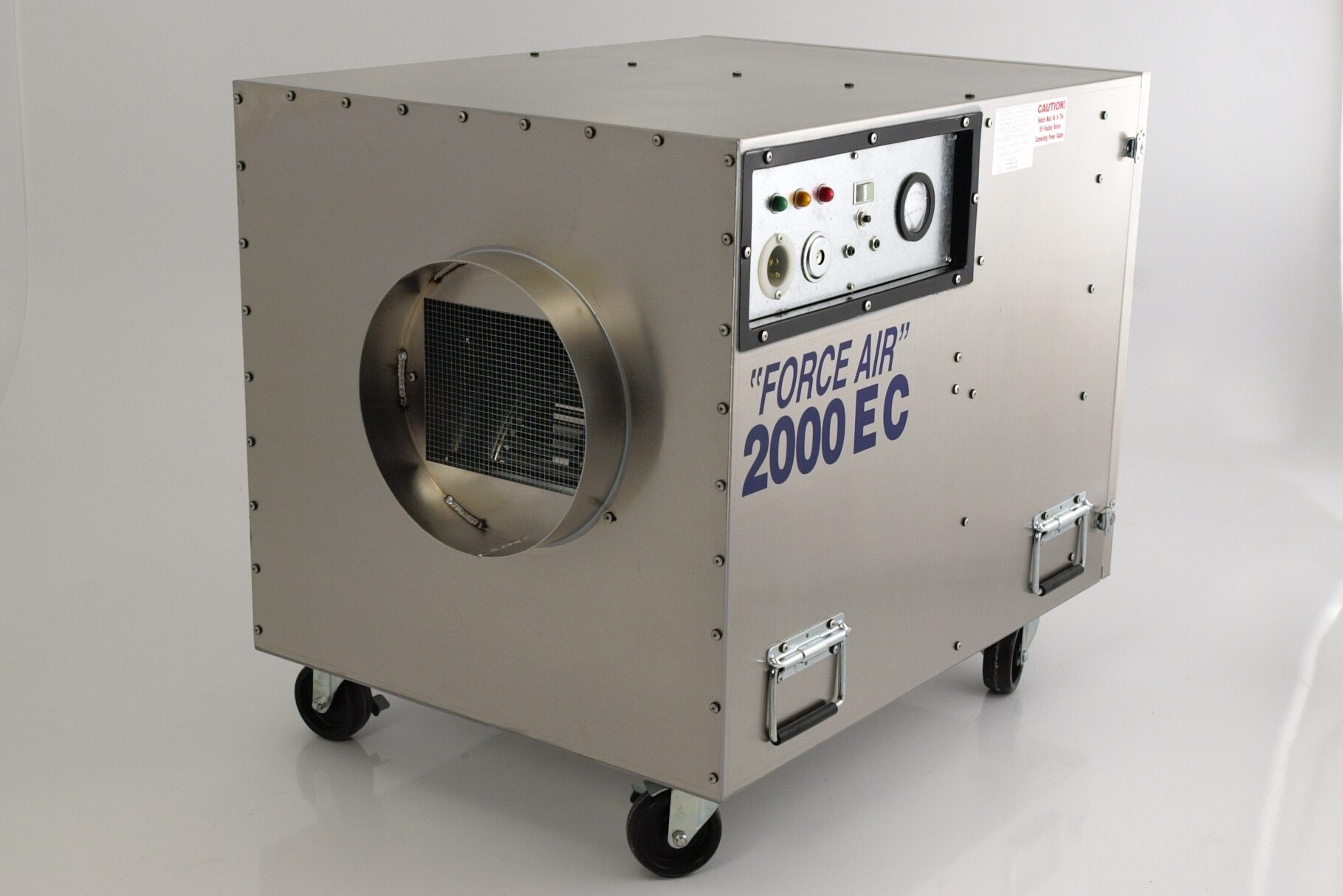
Some feature UV lights for added germicidal action, or stackable designs for space-saving.
Electric models dominate, but battery-powered variants are emerging for remote sites. CFM ratings guide selection: 500-1000 for small areas, 2000+ for commercial.
How to Choose the Right Negative Air Pressure Machine
Selecting one involves assessing space size, contaminant type, and portability needs. Calculate required air changes: for a 1000 sq ft room, aim for 6 changes per hour, needing at least 1000 CFM.
Look for certifications like UL or DOE for HEPA efficiency. Budget for filters, as replacements cost $50-200. Read reviews from sources like Amazon or industry forums for real-user insights.
Setup and Maintenance Tips for Negative Air Pressure Machines
Proper setup is key. Seal the area with polyethylene sheeting, attach ducts if exhausting outside, and monitor pressure with a manometer. Start on low speed to avoid overwhelming filters.
Maintenance includes regular filter checks—replace pre-filters monthly, HEPA every 6-12 months. Clean the housing and inspect for leaks. Always follow manufacturer guidelines to extend lifespan.
Safety Considerations When Using Negative Air Pressure Machines
Safety first: Wear PPE like masks and gloves. Ensure proper ventilation to avoid carbon monoxide buildup if using in enclosed spaces. Electrical safety is crucial—use grounded outlets and avoid wet areas.
In regulated jobs, train operators on protocols. Overloading filters can reduce efficiency, so monitor indicators.
Latest Trends and Innovations in Negative Air Pressure Machines
As of 2026, smart features are trending. IoT-enabled machines allow remote monitoring via apps, alerting users to filter status or pressure drops. Eco-friendly models use recyclable filters and energy-efficient motors.
Hybrid units combining negative pressure with positive air flow for versatile use are gaining popularity. Advances in nanotechnology filters promise even finer particle capture, addressing emerging concerns like microplastics in air.
Conclusion
In an era where air quality directly impacts health and productivity, the negative air pressure machine emerges as a cornerstone of modern containment and filtration strategies. From safeguarding construction workers to protecting hospital patients, these devices offer reliable, efficient solutions to airborne threats. By investing in a quality negative air pressure machine, you’re not just complying with standards—you’re fostering safer, cleaner spaces for everyone. As technology evolves, expect even more innovative ways to harness negative pressure for a healthier future. If you’re in a field prone to contaminants, consider integrating one today; the benefits far exceed the effort.
5 Relevant FAQs
1. What is the main purpose of a negative air pressure machine?
A negative air pressure machine is primarily used to create a contained environment where air pressure is lower inside than outside, preventing contaminants like dust, mold, or pathogens from escaping. It filters the air through HEPA systems and either recirculates or exhausts it, ensuring safety in various settings.
2. How is a negative air pressure machine different from a regular air purifier?
Unlike a standard air purifier that simply cleans room air, a negative air pressure machine is designed for containment. It uses ducting to exhaust filtered air outside and maintains negative pressure to isolate hazards, making it ideal for professional applications like remediation or healthcare.
3. What size negative air pressure machine do I need for my project?
The size depends on the area’s volume and required air changes per hour. For example, a 500 CFM machine suits small rooms, while 2000 CFM handles larger commercial spaces. Calculate based on room dimensions and consult guidelines for your industry.
4. How often should I replace filters in a negative air pressure machine?
Pre-filters should be changed monthly or when clogged, while HEPA filters last 6-12 months depending on usage. Always check the machine’s pressure gauge or indicators, and replace sooner in high-contaminant environments to maintain efficiency.
5. Can a negative air pressure machine be used in residential homes?
Yes, compact models are suitable for homes, especially during renovations, mold removal, or for allergy sufferers. They help contain dust and improve indoor air quality, but ensure proper setup to avoid over-drying or energy waste.


The Software dowsstrike2045 Python update is a search term that has appeared across several technology websites, but the software behind the name is difficult to verify. Some pages describe Dowsstrike2045 as a Python framework, while others associate it with automation, cybersecurity, data processing, or system monitoring. However, these descriptions do not establish a single, documented software project.
More importantly, current searches do not identify a clearly verified public Python package, official developer, or authoritative release history for the exact name “Dowsstrike2045.” One recent investigation found that the corresponding PyPI project could not be located and that online descriptions conflict substantially.
That uncertainty changes how users should approach the subject. Rather than assuming that every article describing a “Dowsstrike2045 Python update” is genuine, developers should first verify the project’s identity, source code, package name, maintainer, release history, and installation channel.
This guide explains what can currently be established, why the name is confusing, how legitimate Python updates normally work, and what to do if you encounter a file or installation command using the Dowsstrike2045 name.
What Is Software Dowsstrike2045 Python?
At present, Software Dowsstrike2045 Python is best treated as an unverified software name or online search term, rather than a confirmed mainstream Python package.
Several websites describe it as though it were an established framework. However, the descriptions vary considerably. Some sources characterize it as an automation or development framework, while others describe cybersecurity, monitoring, or advanced computational capabilities.
That inconsistency matters.
A legitimate Python project normally has identifiable technical evidence behind it. For example, users would typically expect to find some combination of:
- An official project website
- A public source-code repository
- A recognizable developer or organization
- A package listing
- Version numbers
- Release dates
- Documentation
- Installation instructions
- A license
- Issue tracking or support information
- A changelog
Without those elements, it is difficult to establish what the software actually does or whether a particular download represents the original project.
Therefore, readers should not assume that a feature list published on an unrelated blog represents a verified capability of Dowsstrike2045.
Is the Dowsstrike2045 Python Software Real?
There is currently no reliable public evidence establishing Dowsstrike2045 as a recognized Python software project under that exact name.
Recent web investigations reached the same general conclusion. They found no confirmed PyPI project matching the name and no clearly identifiable public GitHub repository or maintainer associated with an established project.
This does not prove that nobody has ever used the name privately.
For example, an internal company project could theoretically use an unpublished name. A private Git repository would not necessarily appear in public searches. Someone could also have used the term as a temporary project name.
The important distinction is that private or hypothetical use is not the same as a publicly verifiable software release.
Consequently, anyone searching for an installation package should verify the source before running it.
Is There a Confirmed Dowsstrike2045 Python Update?
A confirmed official update cannot currently be established from a trustworthy public release channel.
Several websites use phrases such as “Dowsstrike2045 Python update” and provide detailed installation instructions. However, those pages disagree about what the software is and how it should be installed.
That creates an important problem.
A genuine software update should normally be traceable to an original project. A user should be able to identify:
| Verification point | What to look for |
|---|---|
| Developer | A real person, company, or organization |
| Project | Official website or repository |
| Package | Exact package/distribution name |
| Version | Specific release number |
| Changelog | Documented changes |
| Compatibility | Supported Python and operating systems |
| Distribution | Trusted package index or official download |
| Security | Integrity information or signed releases where applicable |
| Support | Issues, documentation, or security contact |
If a page provides an installation command but cannot establish who created the software, the command should not be treated as proof of legitimacy.
Why Are There So Many Different Descriptions?
The unusual search footprint is one of the most important things to understand about this topic.
Some pages describe Dowsstrike2045 as a cybersecurity framework. Others present it as an automation platform, a computational toolkit, or a general Python development system.
A genuine project can certainly have multiple uses. However, its fundamental identity should remain consistent.
For example, established Python projects normally have a stable package name and documentation explaining what the project does. Third-party articles may interpret the project differently, but they can still point readers toward the same underlying source.
With Dowsstrike2045, the bigger problem is the absence of a clearly established underlying source.
This is why developers should be especially cautious about treating unsupported feature lists as technical documentation.
Why You Should Not Immediately Run a Dowsstrike2045 Installation Command
Some websites provide commands resembling:
pip install dowsstrike2045
However, you should not run this command merely because a blog recommends it.
Python’s official packaging guidance explains that pip can install packages from PyPI, version-control repositories, local archives, and other package indexes. That flexibility is useful, but it also means developers need to know where a package is coming from.
The problem with an unverified package name is not simply that the command might fail.
A more serious concern is that a similarly named package could exist somewhere other than the expected official source. A developer who blindly follows an installation command could therefore install software they did not intend to trust.
The safer approach is to verify the package first.
How to Verify an Unknown Python Package
Before installing unfamiliar software, use a structured verification process.
1. Identify the Exact Package Name
Do not confuse the name of an article with the actual Python distribution name.
A project may have:
- A product name
- A GitHub repository name
- A PyPI distribution name
- A Python import name
These can sometimes differ.
Therefore, documentation should identify the exact package that users are expected to install.
2. Check PyPI
If a project claims to be a public Python package, search the Python Package Index.
Check:
- Project name
- Maintainer
- Release history
- Project description
- Dependencies
- Source repository
- Download files
- Recent activity
The absence of a PyPI project does not automatically prove that software is malicious. Developers can distribute private packages or use another legitimate repository.
However, it does mean that a user should not assume that pip install <name> is an official installation method.
3. Check the Source Repository
Look for a real repository containing meaningful development history.
Useful signals include:
- Commit history
- Issues
- Pull requests
- Documentation
- Tests
- License information
- Release tags
- Named contributors
A repository created recently with little or no meaningful history deserves additional scrutiny.
4. Check the Dependencies
Even if the main package appears legitimate, inspect what it installs.
A package may depend on dozens of other libraries. Those dependencies can introduce additional security and compatibility considerations.
This is one reason isolated environments are valuable.
Using a Virtual Environment for Safer Testing
Python’s official packaging documentation recommends virtual environments for working with third-party packages. A virtual environment creates an isolated environment so project dependencies do not interfere with other Python projects.
On Windows, you can create one with:
py -m venv .venv
Then activate it with:
.venv\Scripts\activate
On Linux or macOS:
python3 -m venv .venv
Then:
source .venv/bin/activate
Once activated, Python and pip operate within that environment.
This does not make an unknown package automatically safe. Instead, it reduces the chance that ordinary dependency changes will interfere with unrelated projects.
For unfamiliar software, that distinction is important.
How Legitimate Python Updates Normally Work
For a verified Python package, updating is relatively straightforward.
The Python Packaging User Guide documents the standard upgrade format:
python -m pip install --upgrade PackageName
On Windows, the equivalent can be:
py -m pip install --upgrade PackageName
However, the package name should be replaced only after the project’s identity has been verified.
In other words, the command itself is not the difficult part.
Knowing exactly what you are upgrading is the important part.
Why Version Numbers Matter
A trustworthy software update should identify a specific version.
For example:
- Version 1.2.0
- Version 2.0.0
- Version 2.1.3
A release number lets developers compare changes and determine compatibility.
A vague statement such as “new Dowsstrike2045 Python update” does not provide enough information.
A proper changelog should ideally explain whether an update includes:
- Bug fixes
- Security fixes
- New features
- Removed features
- API changes
- Dependency changes
- Python-version changes
- Operating-system compatibility changes
Without this information, developers cannot reliably assess the impact of an update.
What About the Claims That Dowsstrike2045 Is a Cybersecurity Tool?
Some online articles describe Dowsstrike2045 as a cybersecurity or threat-analysis framework. Other sources describe different functionality.
These claims should be treated as unverified descriptions, not established specifications.
This distinction is particularly important for cybersecurity-related software because security tools can have significant system privileges and can interact with networks, files, credentials, or other sensitive resources.
A developer should never install a supposed security tool simply because an article describes it as powerful.
Instead, verify:
- Who created it.
- Where its source code is hosted.
- What permissions it requires.
- What dependencies it installs.
- What license governs it.
- Whether security researchers or organizations recognize the project.
- Whether releases have a verifiable history.
Could Dowsstrike2045 Be a Typo?
Possibly.
One published source has suggested that the term could be confused with legitimate Python tools associated with CrowdStrike, particularly FalconPy.
That is only one possible explanation, however, and it should not be treated as the definitive origin of the term.
Search queries can contain:
- Typographical errors
- Misspelled product names
- Automatically generated phrases
- Abbreviations
- Internal project names
- Confusion between related products
Therefore, if you encountered “Dowsstrike2045” inside a real project, the surrounding context is important.
For example, a requirements file, import statement, repository URL, or error message may reveal what the user actually needs.
Dowsstrike2045 Python Update vs a Normal Package Update
The difference becomes clearer when the two situations are compared.
| Factor | Verified Python package | Dowsstrike2045 search term |
|---|---|---|
| Public identity | Clearly established | Not clearly established |
| Package source | Traceable | Not confirmed |
| Maintainer | Identifiable | Not verified |
| Version history | Normally available | Not confirmed |
| Documentation | Usually available | Conflicting third-party descriptions |
| Update method | Documented by project | No verified official method |
| Changelog | Expected | Not confirmed |
| Installation | Known package/source | Should not be assumed |
| Security assessment | Can be investigated | Identity itself remains uncertain |
This comparison explains why ordinary Python update instructions should not automatically be applied to Dowsstrike2045.
What If You Already Installed a Dowsstrike2045 File?
If you already downloaded or executed a file using this name, do not assume that the file is genuine simply because it appeared in a search result.
First, identify what you actually installed.
Check:
- The download URL
- File name
- File type
- Installation date
- Python environment
- Package list
- Repository or source
- Commands you executed
- New files created by the installer
If you used pip inside a virtual environment, you can inspect installed packages with:
python -m pip list
You can also record the environment’s dependencies:
python -m pip freeze
The Python Packaging User Guide documents pip freeze as a way to output installed packages and their versions, which can help reproduce or audit an environment.
If you executed an unknown script outside an isolated environment, consider disconnecting the affected system from sensitive networks while you investigate, particularly if the software requested elevated privileges or access to credentials.
For serious security concerns, use a trusted security professional or your organization’s incident-response process rather than attempting to diagnose a potentially compromised system casually.
Common Mistakes When Searching for Dowsstrike2045 Python
Mistake 1: Treating Search Results as Documentation
A search result is not proof that software exists.
The important question is whether the result leads back to an identifiable original project.
Mistake 2: Copying Commands From Blogs
Installation commands should come from the project’s verified documentation or a trusted package-management workflow.
Copying commands from unrelated websites can introduce unnecessary risk.
Mistake 3: Assuming a Detailed Article Must Be Accurate
Some online articles provide extremely specific version numbers, APIs, installation paths, and feature descriptions. Detail alone does not establish accuracy.
A claim becomes more credible when readers can independently verify it.
Mistake 4: Installing Globally
Python’s packaging documentation recommends virtual environments because they isolate project dependencies and reduce conflicts between applications.
Mistake 5: Ignoring Dependency Changes
Updating one library can change other dependencies. That is why developers should maintain a requirements file or another dependency-management strategy for important projects.
A Better Way to Handle Unknown Software Names
When an unfamiliar Python project appears online, use this simple checklist:
Identify → Verify → Isolate → Test → Update
First, identify the exact project and package name.
Next, verify the developer, repository, documentation, and distribution channel.
Then, isolate the software inside a virtual environment.
Afterward, test it without exposing important credentials or production data.
Finally, update it only through the project’s verified release mechanism.
This method works not only for Dowsstrike2045 but for almost any unfamiliar Python package.
Frequently Asked Questions
Is Software Dowsstrike2045 Python a real program?
There is currently no reliable public evidence establishing “Dowsstrike2045 Python” as a recognized public Python package under that exact name. Several websites describe it differently, but a verified developer, official package listing, and consistent release history have not been established. Therefore, users should treat the name as unverified rather than assuming it represents an installable product.
Is there an official Dowsstrike2045 Python update?
No authoritative public update channel has been verified for the exact Dowsstrike2045 name. Websites use the phrase “Python update,” but their instructions and descriptions conflict. Until an original developer, repository, package, and release history can be confirmed, there is no reliable basis for claiming that a particular Dowsstrike2045 update is official.
Can I install Dowsstrike2045 with pip?
You should not assume that you can safely install it with pip. A command such as pip install dowsstrike2045 should only be used when the exact distribution name has been confirmed through a trustworthy project source. Python’s packaging tools can install packages from several sources, so verifying the origin is essential.
Why are there different descriptions of Dowsstrike2045?
Different websites describe the name as an automation framework, cybersecurity tool, computational system, or development platform. These conflicting descriptions are one reason the project’s identity remains uncertain. Without an authoritative repository or documentation, those descriptions should be considered claims made by individual websites rather than established software specifications.
Is Dowsstrike2045 Python malware?
There is not enough evidence to conclude that the name itself represents malware. However, the lack of a verified project means users cannot confidently establish what a file using that name contains. A download offered under an unverified software name should therefore be treated cautiously until its source, contents, and developer can be independently confirmed.
What is the safest way to test an unknown Python package?
Use a dedicated virtual environment, verify the source before installation, avoid sensitive credentials, inspect dependencies, and test the software with non-production data. Python’s official packaging documentation recommends virtual environments for isolating third-party packages and preventing dependency conflicts between projects.
What should I do if a Dowsstrike2045 update breaks my Python project?
First, identify the actual package and version that changed. Check the project’s release notes, compare the previous dependency versions, and reproduce the problem in an isolated environment. If the software cannot be traced to a legitimate project, avoid repeatedly reinstalling unknown files and instead determine where the original package came from.
Key Takeaway
The Software dowsstrike2045 Python update is currently surrounded by more uncertainty than established technical documentation. Multiple websites describe the name as different types of Python software, yet current public evidence does not establish a consistent developer, official package, or authoritative release channel.
For that reason, the safest approach is not to invent an installation method or trust an unfamiliar download. Instead, verify the exact package identity, inspect its source, use an isolated Python environment, and rely on official documentation whenever an authentic project can be identified.
Python itself provides strong tools for managing dependencies safely. Virtual environments can isolate projects, while pip provides documented methods for installing, upgrading, and recording package versions.
Until Dowsstrike2045 can be tied to a verifiable software project, treat claims about its features, versions, and updates as unconfirmed.




Nicole Johag: Age, Wealth, Partner, Children and Career

Who is Katja Streso married to? Child, Net worth, Career Explained

Bernd Fuchs: Wife, Age, Height, Net Worth & Career
-

 Entertainment9 years ago
The final 6 ‘Game of Thrones’ episodes might feel like a full season
-

 lifestyle6 months ago
Creative Conference Room Ideas to Enhance Productivity and Collaboration in 2026
-
Fashion9 years ago
According to Dior Couture, this taboo fashion accessory is back
-
Entertainment9 years ago
The old and New Edition cast comes together to perform
-
Business9 years ago
The 9 worst mistakes you can ever make at work
-
Business9 years ago
Uber and Lyft are finally available in all of New York State
-
Entertainment9 years ago
Disney’s live-action Aladdin finally finds its stars
-
Sports9 years ago
Steph Curry finally got the contract he deserves from the Warriors